> ## Documentation Index
> Fetch the complete documentation index at: https://docs.getcara.ai/llms.txt
> Use this file to discover all available pages before exploring further.
# AMS360
> Connect your AMS360 agency management system to Cara
### Integration Capabilities
The integration capabilities are determined by AMS360's API endpoints.
| | **Read** | **Write** |
| ------------- | -------- | --------- |
| **Accounts** | ✅ | ✅ |
| **Contacts** | ✅ | ❌ |
| **Policies** | ✅ | ❌ |
| **Calls** | ❌ | ✅ |
| **Notes** | ✅ | ✅ |
| **Tasks** | ❌ | ✅ |
| **Documents** | ❌ | ✅ |
### Connect AMS360 to Cara
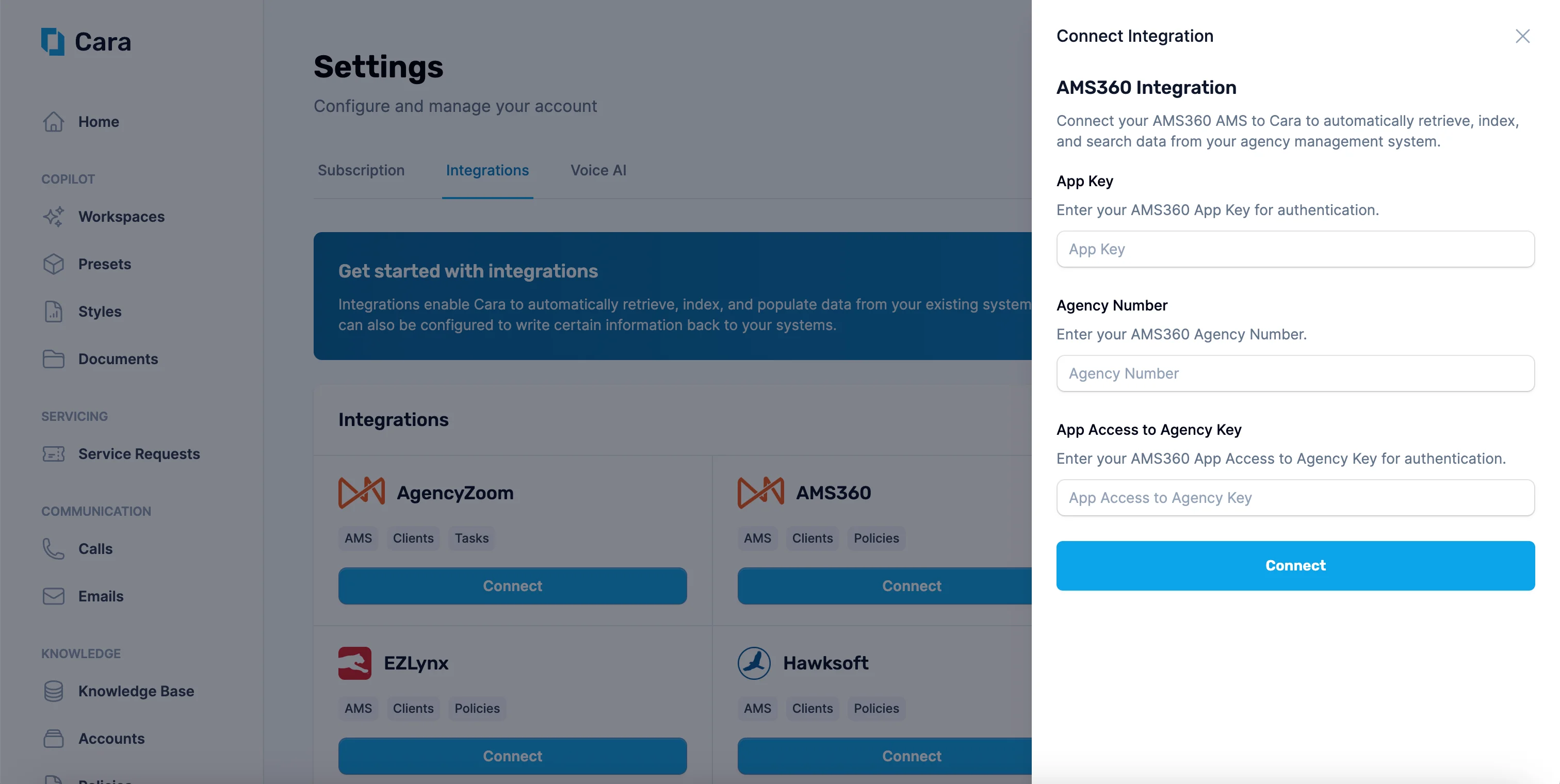
You'll need three pieces of information from your AMS360 account to connect:
* **App Key** — Your API application key
* **Agency Number** — Your agency number in AMS360
* **App Access to Agency Key** — Your app access key for agency authentication
Contact your AMS360 administrator or Vertafore representative if you don't have these credentials.
Navigate to the [Integrations](https://app.getcara.ai/app/settings/integrations) tab in Cara and click on the "[Connect](https://app.getcara.ai/app/settings/integrations/connect/AMS_360)" button on the "AMS360" tile. Enter your **App Key**, **Agency Number**, and **App Access to Agency Key**, then click **Connect**.
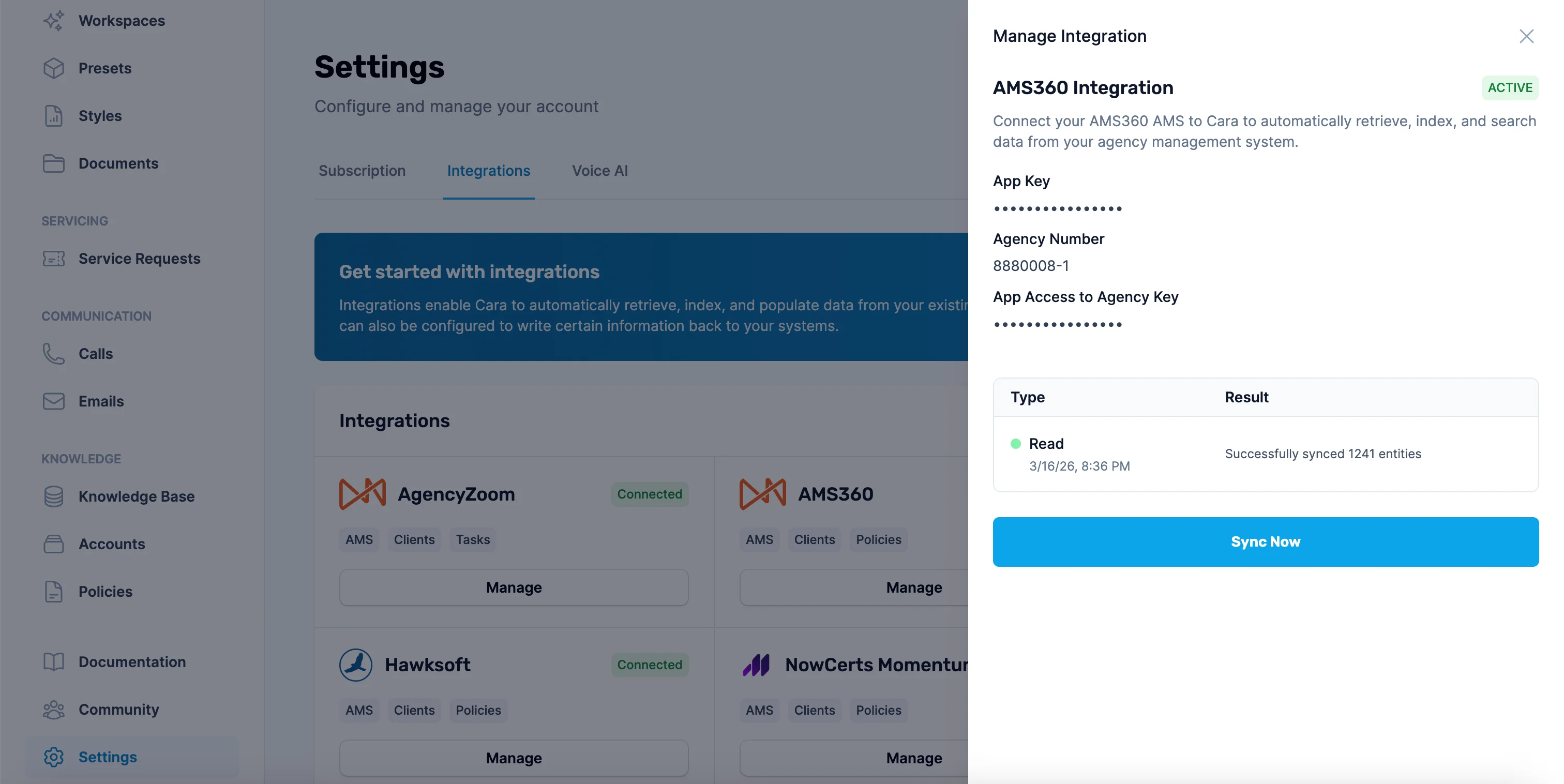
 Once connected, Cara will automatically sync your AMS360 data every hour. You can also click the **Sync Now** button at any time to trigger a manual sync. The sync log shows the status and number of entities synced.
 ### Use the Integration
Cara can read from and write to AMS360 **automatically** or **on-demand**.
**Automatic actions**
* **Customer lookup:** References client information based on the caller's phone number or email during [Voice AI](/communication/voiceai) calls.
* **Call logging:** Logs calls handled by Voice AI as activities in AMS360, including caller info, call summary, transcript, and recording URL.
* **Task creation:** Creates suspenses from service requests generated by Voice AI calls or forwarded [Email AI](/communication/emailai) threads.
**Manual / On-Demand actions**
* **Search or summarize client information:** Use Copilot or Email AI to look up client details, policy information, or activity history.
* **Write notes, tasks, or documents:** Direct Cara to add activities, suspenses, or upload documents to a specific client account via Copilot or Email AI.
* **Create or update customers:** Ask Cara to create new customer records or update existing ones in AMS360.
**Cara identifies customers by email or phone number.** It also searches attachments and provided content for contact details, though it's best to include them directly in the request. If it can't find or confirm the account, it will ask for more information.
### Example Use Cases
You can use the integration in multiple ways based on your agency's workflow.
1. **Search and summarize client information**
* *How:* [Email Cara](/communication/emailai) or use Copilot (e.g., [Ask Cara Directly](/copilot/askcara)).
* *Example request:* "Summarize all policies for this customer, including premiums and renewal dates."
* *Example follow-up actions:*
* Ask Cara to draft an email highlighting upcoming renewals.
* Ask Cara to identify cross-sell opportunities and draft emails to customers.
2. **Upload documents to customer accounts**
* *How:* [Email Cara](/communication/emailai) or use Copilot (e.g., [Ask Cara Directly](/copilot/askcara)).
* *Example request:* "Add this document to AMS360."
* Documents can include those created by Cara—such as coverage comparisons, ACORD forms, and COIs—as well as any other relevant files, like invoices, policy documents, or endorsement notices.
3. **Log activities and create tasks**
* *How:* [Email Cara](/communication/emailai) or use Copilot (e.g., [Ask Cara Directly](/copilot/askcara)).
* *Example request:* "Create a suspense for John Smith's account to follow up on his renewal by next Friday."
* Cara can also log activities and add comments to existing activities.
These are just a few examples; there are many ways to use the integration within your agency workflow. For additional assistance, contact [**support@getcara.ai**](mailto:support@getcara.ai).
### Tips
* Keep your AMS360 customer data up to date so Cara can match records correctly.
* Cara syncs your AMS360 data automatically every hour. Use the **Sync Now** button if you need to pull in recent changes immediately.
* Use Copilot when you want to double-check or manually control what gets saved.
### Use the Integration
Cara can read from and write to AMS360 **automatically** or **on-demand**.
**Automatic actions**
* **Customer lookup:** References client information based on the caller's phone number or email during [Voice AI](/communication/voiceai) calls.
* **Call logging:** Logs calls handled by Voice AI as activities in AMS360, including caller info, call summary, transcript, and recording URL.
* **Task creation:** Creates suspenses from service requests generated by Voice AI calls or forwarded [Email AI](/communication/emailai) threads.
**Manual / On-Demand actions**
* **Search or summarize client information:** Use Copilot or Email AI to look up client details, policy information, or activity history.
* **Write notes, tasks, or documents:** Direct Cara to add activities, suspenses, or upload documents to a specific client account via Copilot or Email AI.
* **Create or update customers:** Ask Cara to create new customer records or update existing ones in AMS360.
**Cara identifies customers by email or phone number.** It also searches attachments and provided content for contact details, though it's best to include them directly in the request. If it can't find or confirm the account, it will ask for more information.
### Example Use Cases
You can use the integration in multiple ways based on your agency's workflow.
1. **Search and summarize client information**
* *How:* [Email Cara](/communication/emailai) or use Copilot (e.g., [Ask Cara Directly](/copilot/askcara)).
* *Example request:* "Summarize all policies for this customer, including premiums and renewal dates."
* *Example follow-up actions:*
* Ask Cara to draft an email highlighting upcoming renewals.
* Ask Cara to identify cross-sell opportunities and draft emails to customers.
2. **Upload documents to customer accounts**
* *How:* [Email Cara](/communication/emailai) or use Copilot (e.g., [Ask Cara Directly](/copilot/askcara)).
* *Example request:* "Add this document to AMS360."
* Documents can include those created by Cara—such as coverage comparisons, ACORD forms, and COIs—as well as any other relevant files, like invoices, policy documents, or endorsement notices.
3. **Log activities and create tasks**
* *How:* [Email Cara](/communication/emailai) or use Copilot (e.g., [Ask Cara Directly](/copilot/askcara)).
* *Example request:* "Create a suspense for John Smith's account to follow up on his renewal by next Friday."
* Cara can also log activities and add comments to existing activities.
These are just a few examples; there are many ways to use the integration within your agency workflow. For additional assistance, contact [**support@getcara.ai**](mailto:support@getcara.ai).
### Tips
* Keep your AMS360 customer data up to date so Cara can match records correctly.
* Cara syncs your AMS360 data automatically every hour. Use the **Sync Now** button if you need to pull in recent changes immediately.
* Use Copilot when you want to double-check or manually control what gets saved.