> ## Documentation Index
> Fetch the complete documentation index at: https://docs.getcara.ai/llms.txt
> Use this file to discover all available pages before exploring further.
# EZLynx
> Connect your EZLynx AMS to Cara via API or automated CSV reports
### Integration Capabilities
Cara supports two modes for syncing EZLynx data:
* **CSV import-only** — no credentials needed. Email CSV reports to Cara and she keeps your data up to date.
* **API mode** — connect with EZLynx credentials for richer, more detailed data.
| | **Read** (CSV-only) | **Read** (API) | **Write** |
| -------------- | ------------------- | -------------- | --------- |
| **Applicants** | ✅ | ✅ | ❌ |
| **Policies** | ✅ | ✅ | ❌ |
| **Calls** | ✅ | ✅ | ✅ |
| **Notes** | ✅ | ✅ | ✅ |
| **Tasks** | ✅ | ✅ | ❌ |
| **Documents** | ❌ | ❌ | ❌ |
### How it works
**CSV import-only mode**
Email your EZLynx reports (applicants, policies, etc.) as CSV attachments to `ezlynx@inbox.getcara.ai` from an authorized agency email address. Cara will match the email to your agency, sync the data, and make it available for search, summaries, and automations.
**API mode**
When you add EZLynx credentials, Cara pulls richer details directly from EZLynx. You can still send CSV reports — Cara uses both together to keep your data as complete as possible.
If no EZLynx integration is found for your email address, or if sync is disabled, the CSVs will not be processed. Make sure the integration is set up and enabled first.
### Connect EZLynx to Cara
#### Option 1: CSV import-only (no credentials)
Navigate to the [Integrations](https://app.getcara.ai/app/settings/integrations) tab in Cara and click on the **EZLynx** tile. Select **CSV import-only**.
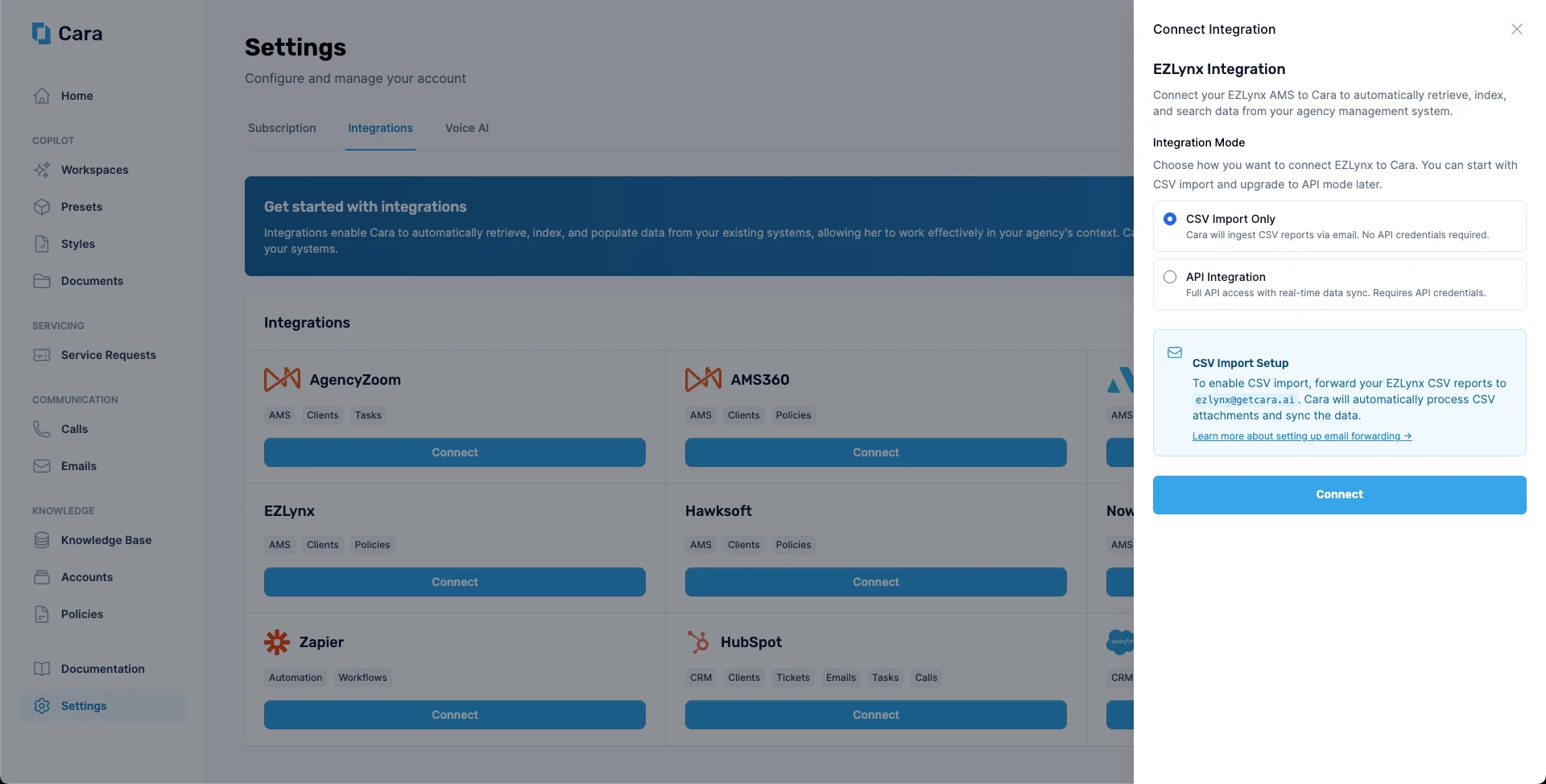 Work with the Cara team to confirm which email addresses will be used to send CSV reports from your agency. Cara matches incoming emails to your integration by sender address.
Generate your EZLynx reports as CSV files and email them as attachments to **`ezlynx@inbox.getcara.ai`**. Cara will sync the data automatically.
#### Option 2: API mode (with credentials)
Work with your EZLynx administrator to obtain:
* **Client ID**
* **Client Secret**
* **Username**
* **Password**
* **App Secret**
* **Integration Group ID**
In the [Integrations](https://app.getcara.ai/app/settings/integrations) tab, click the **EZLynx** tile and select **API mode**. Enter your credentials and save.
Work with the Cara team to confirm which email addresses will be used to send CSV reports from your agency. Cara matches incoming emails to your integration by sender address.
Generate your EZLynx reports as CSV files and email them as attachments to **`ezlynx@inbox.getcara.ai`**. Cara will sync the data automatically.
#### Option 2: API mode (with credentials)
Work with your EZLynx administrator to obtain:
* **Client ID**
* **Client Secret**
* **Username**
* **Password**
* **App Secret**
* **Integration Group ID**
In the [Integrations](https://app.getcara.ai/app/settings/integrations) tab, click the **EZLynx** tile and select **API mode**. Enter your credentials and save.
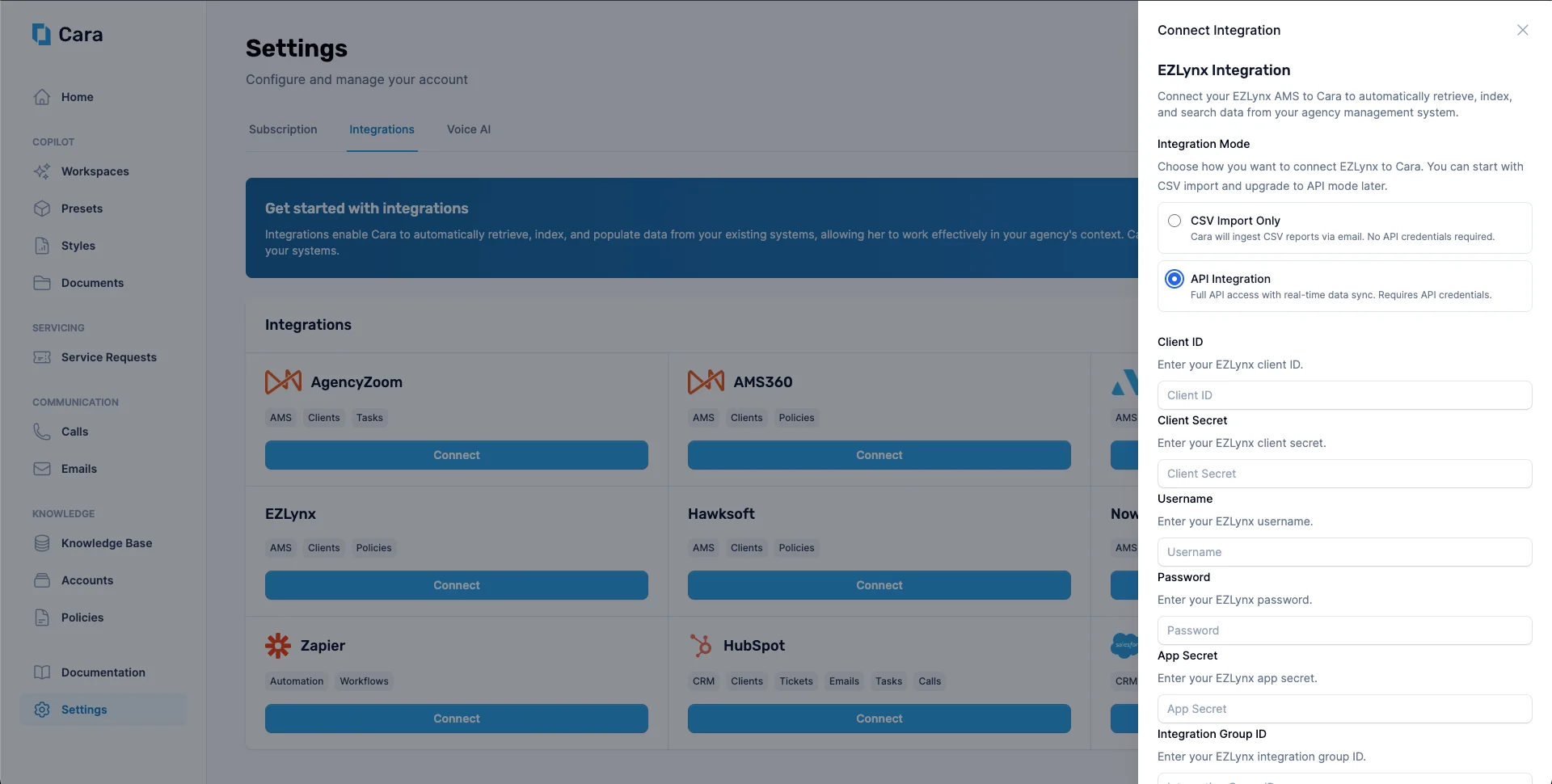 Even in API mode, you can continue sending CSV reports to `ezlynx@inbox.getcara.ai`. Cara will use them together with the API to keep your data up to date.
You can switch between modes at any time from the EZLynx integration settings in Cara.
### Tips
* **Schedule periodic reports** from EZLynx to be emailed automatically to `ezlynx@inbox.getcara.ai` (for example, nightly or weekly) so Cara always has fresh data.
* **Standardize your report templates** in EZLynx so column names stay consistent across exports.
* For questions about supported CSV formats, contact [**support@getcara.ai**](mailto:support@getcara.ai).
Even in API mode, you can continue sending CSV reports to `ezlynx@inbox.getcara.ai`. Cara will use them together with the API to keep your data up to date.
You can switch between modes at any time from the EZLynx integration settings in Cara.
### Tips
* **Schedule periodic reports** from EZLynx to be emailed automatically to `ezlynx@inbox.getcara.ai` (for example, nightly or weekly) so Cara always has fresh data.
* **Standardize your report templates** in EZLynx so column names stay consistent across exports.
* For questions about supported CSV formats, contact [**support@getcara.ai**](mailto:support@getcara.ai).