> ## Documentation Index
> Fetch the complete documentation index at: https://docs.getcara.ai/llms.txt
> Use this file to discover all available pages before exploring further.
# Quickstart
> A rapid-fire guide to start using Cara
**Welcome!** This quickstart guide will help you get up and running with Cara in just minutes. For more in-depth information, explore the other articles in the taskbar on the left of the page.
## Login
To get started:
1. Visit your Agency Portal: [https://app.getcara.ai/app](https://app.getcara.ai/app)
2. Enter your email address
3. Input the 6-digit verification code from your email to log in
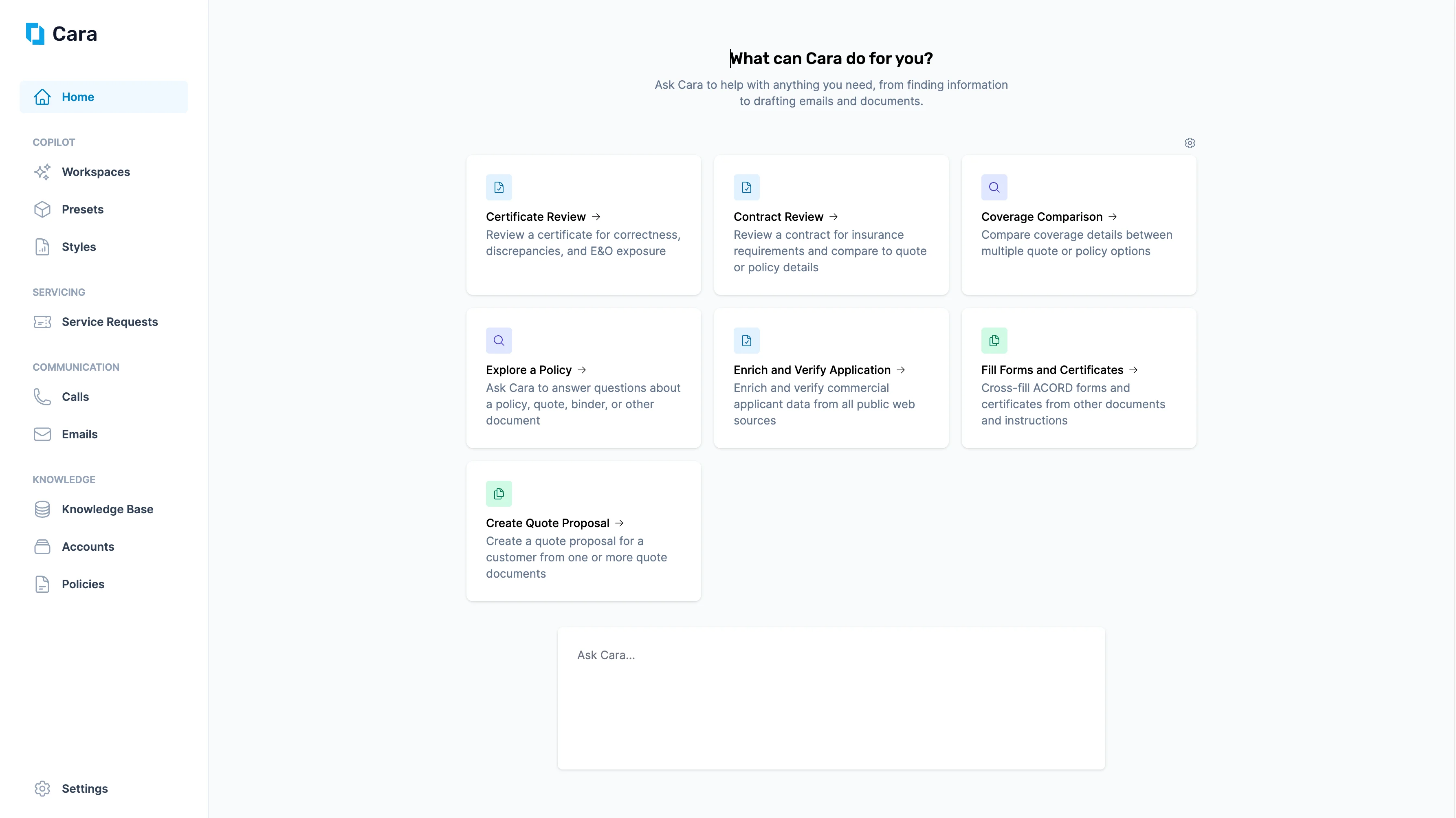
Once you've successfully logged in, you'll land on the **Cara homepage**.
 ## Get Started
From here, you have three main ways to get started:
1. **Use the Left-Hand Navigation Sidebar.** Navigate directly to one of Cara's four core modules:
* [Copilot](/copilot/overview)
* [Servicing](/servicing/overview)
* [Communication](/communication/overview)
* [Knowledge](/knowledge/overview)
2. **Launch a Preset.** The homepage also displays prebuilt Cara Presets. You can click into any Preset to start a new workspace.
3. [**Ask Cara Directly**](/copilot/askcara)**.** At the bottom of the page, you'll see a free-text input bar. Let Cara help you search the web, draft emails, generate documents, or complete other tasks. Type a question or instruction, and Cara will respond in real time.
Think of Cara as your always-on CSR—ready to take actions, surface insights and create documents.
## Get Started
From here, you have three main ways to get started:
1. **Use the Left-Hand Navigation Sidebar.** Navigate directly to one of Cara's four core modules:
* [Copilot](/copilot/overview)
* [Servicing](/servicing/overview)
* [Communication](/communication/overview)
* [Knowledge](/knowledge/overview)
2. **Launch a Preset.** The homepage also displays prebuilt Cara Presets. You can click into any Preset to start a new workspace.
3. [**Ask Cara Directly**](/copilot/askcara)**.** At the bottom of the page, you'll see a free-text input bar. Let Cara help you search the web, draft emails, generate documents, or complete other tasks. Type a question or instruction, and Cara will respond in real time.
Think of Cara as your always-on CSR—ready to take actions, surface insights and create documents.